1. Menu and pricing rules
Define categories, product options, modifiers, required choices, prices, availability and location-specific differences.
I build connected restaurant ordering systems, Android food kiosks and back-office software around the way your operation works, from menu management and order capture to kitchen workflows and device controls.
I develop bespoke restaurant ordering software that connects customer orders with the systems and staff responsible for preparing and managing them. I have built a Laravel and Android food-ordering platform with kiosks and back-office tools.
A custom restaurant ordering system can bring together menu management, product options, customer orders, payment workflows, kitchen status and collection or delivery rules. Where the requirements allow, a kiosk and website can use shared menu and order-management logic while presenting an experience suited to each channel.
The back office is just as important as the ordering interface. Staff need practical ways to manage prices and availability, review incoming orders, monitor operational activity and resolve exceptions without relying on manual workarounds.
I plan the operational controls alongside the customer experience. Depending on the project, the scope can focus on takeaway ordering, Android food kiosks, kitchen workflows or a connected restaurant back office.
A restaurant ordering system needs to do more than collect an order. Menu choices, prices, availability, payment, kitchen preparation and collection or delivery all need to work together.
When ordering channels and operational tools are disconnected, staff can end up updating the same information in several places or manually resolving orders that cannot be fulfilled as expected.
I can draw on I’s existing Laravel and Android restaurant platform, which includes food-ordering kiosks and back-office tools for menus, prices, devices, orders and live kitchen activity. That experience provides a relevant starting point for discussing the requirements of a new system.
A bespoke restaurant platform can share menu and order-management logic across supported ordering channels while giving staff the controls they need to run a service.
Plan for sold-out items, order amendments, cancellations, payment failures and device interruptions. These exceptions are part of the service workflow, not just technical edge cases.
The scope should cover the complete order lifecycle, including how staff maintain menus, how orders reach the kitchen and what happens when something goes wrong.
Define categories, product options, modifiers, required choices, prices, availability and location-specific differences.
Map order creation, payment status, kitchen preparation, amendments, cancellations and collection or delivery.
Define preparation states, order routing, station responsibilities and the information kitchen staff need to see.
Plan device registration, screen flow, staff controls, recovery procedures and any required restricted-device behaviour.
Specify payment confirmation, failed transactions, customer receipts and order-ready notifications where required.
A useful system should help staff run a busy service consistently, not simply display products and accept orders.
| Question to ask | A surface answer | A useful project answer |
|---|---|---|
| How are menus maintained? | Edit products in an admin area. | Manage availability, prices, modifiers and location-specific rules across the relevant channels. |
| How does an order reach the kitchen? | Display it on a screen. | Define routing rules, preparation states, amendments and clear handling of exceptions. |
| What happens when an item sells out? | Remove it from the menu. | Control availability and define how existing baskets or confirmed orders are handled. |
| How are kiosk problems handled? | Restart the device. | Provide appropriate device status, staff recovery controls and a defined response to connection failures. |
| Can staff see what is happening across the service? | View an order list. | Provide relevant order states, operational filters and reporting for the people managing the service. |
If you need a restaurant website to showcase a menu and direct customers to an existing ordering service, a conventional website may be all you need.
Bespoke restaurant software is worth considering when you need control over the ordering experience, dedicated Android kiosks, custom kitchen workflows or a back office that connects operational information in one place.
I can help define the right scope, whether that means a focused kiosk application, a connected ordering workflow or a wider restaurant platform. Building every component from scratch is not always necessary.
A food-ordering kiosk is only one part of the system. The underlying menu rules, order processing, kitchen workflow, device management and staff controls determine how well it works in day-to-day service.
I have existing experience with an Android kiosk and Laravel back-office platform. I can use that experience to discuss your operational requirements and identify which parts need to be developed, integrated or adapted for your project.
The first release should prioritise the workflows that matter most, with clear plans for payment handling, menu changes, device recovery and the operational support needed after launch.
You do not need a complete technical brief. I can map how orders move from customers to the kitchen, identify where menus, devices and staff workflows need to connect, and define a practical scope before development begins.
Ordering channels are easier to manage when they use consistent menu information and give staff a clear way to track incoming work.
I start by understanding the work the system needs to support. I keep decisions clear as the project moves from initial planning into development and launch.
I map the users, information, hand-offs and problems the software needs to solve.
I define the core features, data, integrations and a realistic first release with you.
I develop and test the application, then review it against real tasks and your feedback.
I help get the system live and plan sensible improvements as your requirements evolve.
A connected Android food-ordering kiosk and Laravel back-office platform for restaurant ordering operations.
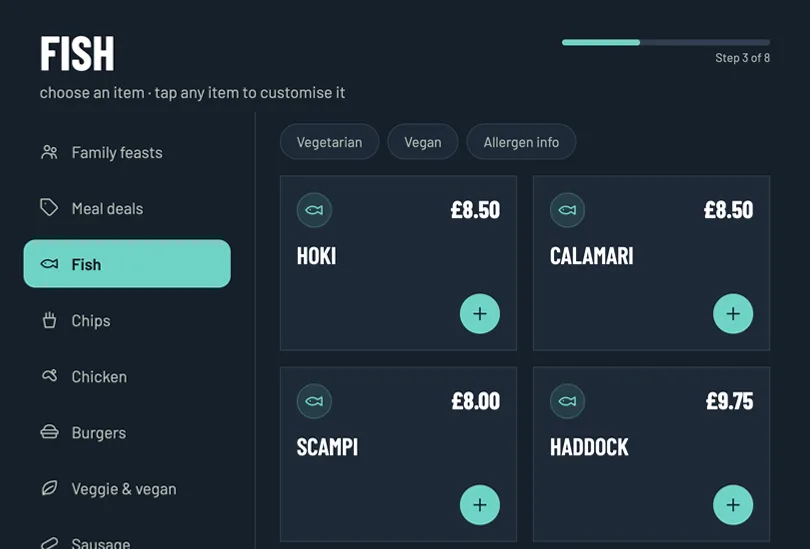
An intuitive self-service ordering and loyalty kiosk for Ocean Fry, integrated with a centralized Laravel back-office system.
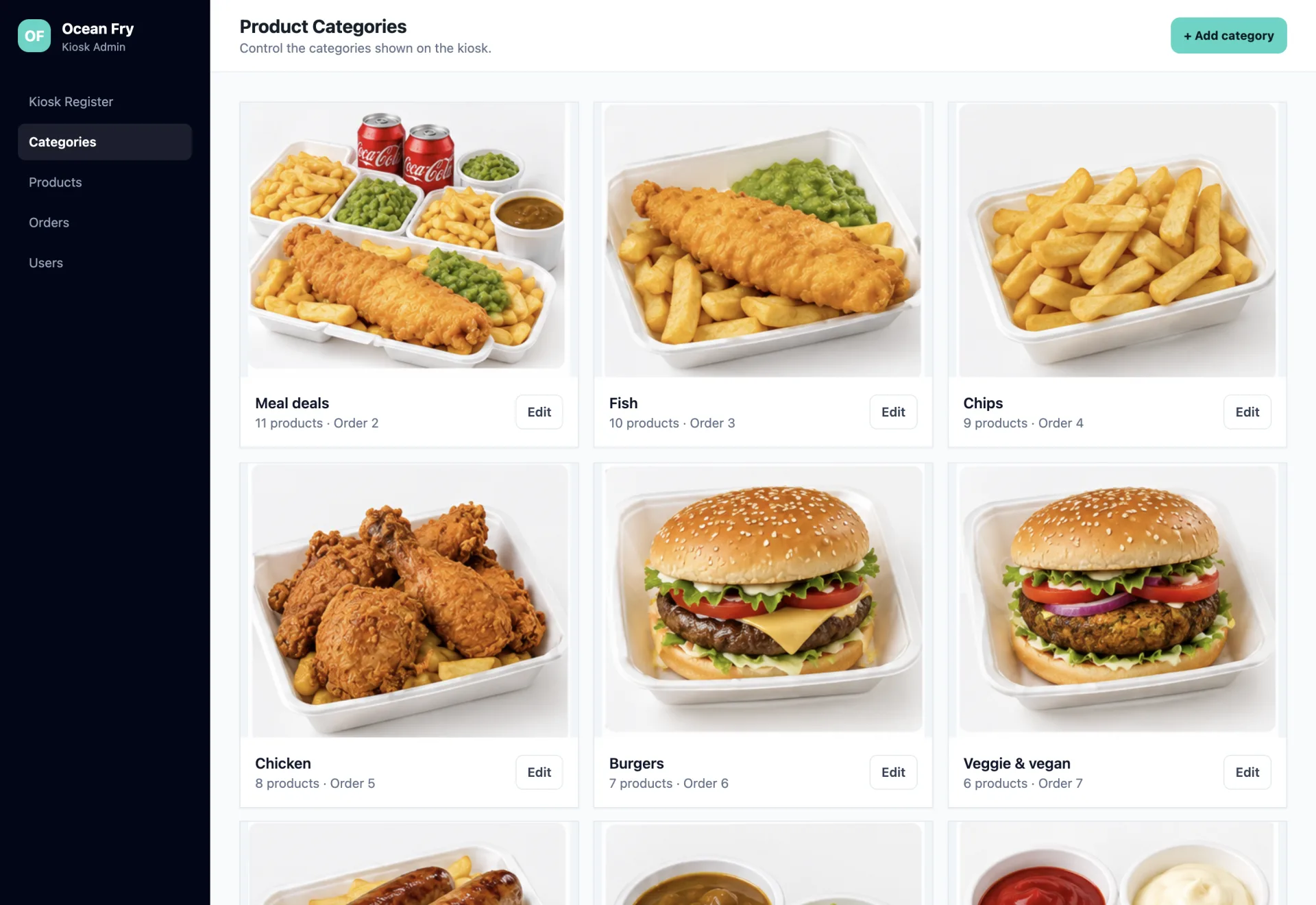
Streamlined restaurant operations and kiosk configuration through a centralized Laravel back office connected to floor-deployed Android ordering terminals.
Common questions about restaurant ordering platforms, food-ordering kiosks and back-office systems.

I'm a web developer specialising in Laravel, WordPress and mobile app development. I build fast, reliable websites and web apps, and I work directly with you from first email to launch, with no agencies or middlemen. Rated 5.0 everywhere my clients have left a review.
We only use non-identifying analytics cookies to understand how the site is used and help us improve it. Read our cookie policy.